Blog

Learn more about Mazda & Apple CarPlay at Passport Mazda

Apple Car Play™ 

USER GUIDE 

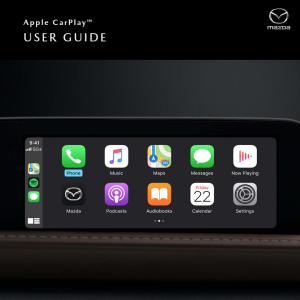
Available on select models, Apple CarPlay™ seamlessly integrates your iPhone® with your vehicle’s Mazda Connect™ display, allowing you to access useful features and apps while staying focused on the road ahead.

BASIC REQUIREMENTS 

•   To use Apple CarPlay, you’ll need an iPhone 5 or above

•   For best performance, it is always recommended that you update your iPhone to the latest iOS version

•   You’ll need an Apple Lightning® to USB cable to make the connection

•   Siri® must be enabled to use Apple CarPlay

CONNECT YOUR i PHONE 

1. Connect an Apple Lightning to USB cable to your iPhone and the USB port in the center stack or inside the center armrest (depending on vehicle model)

2. Mazda Connect™ will detect your iPhone

3. If you’re a first-time user, follow the on-screen prompts to enable Apple CarPlay

4. If you’re a first-time user, select ”Allow” on the pop-up notification displayed on your iPhone. This will allow your vehicle to access Apple CarPlay content on your iPhone without requiring you to unlock your iPhone first

On vehicles equipped with Wireless CarPlay, such as the 2023 Mazda CX-50, an additional pop-up notification will be displayed on your iPhone asking, "Use Wireless Apple CarPlay with "Mazda"?" Select "Enable Wireless CarPlay" if you'd like to enable wireless connectivity or select "Use USB Only" if you'd like only to use Apple CarPlay when your iPhone is connected via USB.

Enabling a Wireless Apple CarPlay Connection After Connecting Via USB

After the Apple CarPlay user interface has appeared on the Mazda Connect display, you can unplug the USB cable which will end the current Apple CarPlay session. To enable the wireless connection to Apple CarPlay:

1. Press the Home button

2. Tilt the Commander Knob to the right

3. Select the desired Apple device

4. Mazda Connect will establish a wireless connection with the device and the Apple CarPlay user interface will

resume on the Mazda Connect display                                                                                                                               2

 COMMANDER CONTROL 

Once connected, the easiest way to quickly access Apple CarPlay from the Mazda Connect screen is to press and HOLD the Home button until the Apple CarPlay screen appears.

Once connected, slide the Commander control to the right when on the Mazda Connect home screen and the Apple CarPlay icon is present.

SECTIONS AND ICONS 

MAPS

Displayed prominently in the middle of the screen.

Note: The Maps section of Dashboard View will always display Apple Maps. Third-party navigation apps can be used via Apple CarPlay, but will not appear in Dashboard View.

SMART SIRI SUGGESTIONS

Provides quick access to commonly used tasks. This allows you to view, interact with and/or select three of your most recently used apps (e.g., music, podcasts, meeting notices via calendar app, etc.).

SIDEBAR

Displays your most recent (or currently in-use) icons, time, signal and network, and the App View icon (formerly the “Home” icon).

•   Using the Commander control, highlight and press the App View icon to change to App View

• Using the Commander control, highlight, press and HOLD the App View icon to activate Siri

 APPS

Ten app tiles are displayed on the App View screen. Rotate the Commander control to highlight an app in blue. Press down to launch.

 RECENTLY USED APPS

Displayed on the left side of the App View screen.

Note: The recently used apps sidebar is not selectable when in App View.

 DASHBOARD VIEW/APP VIEW

•   Short press – Switches to Dashboard View

• Long press – Activates Siri

Displays upcoming appointments from your Calendar App. If a destination is attached to an appointment, you can launch Apple Maps for directions straight from the Calendar App.

Access personalization settings that include:

•   Do Not Disturb While Driving (pauses all notifications)

•   Appearance – “Automatic” (light/dark) or “Always use Dark Mode”

•   Siri Suggestions (On/Off)

• Show album art (On/Off)

Select the Mazda icon to return to the Mazda Connect home screen. You can also press and HOLD the Home button on the Commander control to toggle between Apple CarPlay and Mazda Connect interfaces.

Dots at the bottom of the screen indicate that there are more available apps. Rotate the Commander control to the right to view more apps.

USING THE COMMANDER CONTROL ON THE HOME SCREEN 

The sidebar contains recently used apps, clock, signal strength and the Home button. The sidebar is available on all Apple CarPlay screens

•   To highlight a recently used app, rotate the Commander control to the left, then press down to select and launch the highlighted app

•   To highlight the Home button, rotate the Commander control to the left. Press the knob to return to the Apple CarPlay home screen. Press and hold the knob to activate Siri

 MAIN DISPLAY

The middle of the screen displays apps compatible with Apple CarPlay

•   Rotate the Commander knob left or right to highlight the desired app (or feature tile in Dashboard view)

▪   Slide the Commander control forward/rearward to quickly skip from one line to the next

•   Press down on the knob to select and launch the app (or to access a feature tile in Dashboard View)

 ADDITIONAL APPS

•   To access additional pages of apps, rotate the Commander control to the right. Or, at the end of a line of icons,

slide the Commander control to the right

HOME BUTTON

•   Press and HOLD the Home button to toggle between Apple CarPlay and Mazda Connect screens (when a compatible iPhone is connected)

• Press the Home button to quickly return to the Apple CarPlay home screen from inside Apple CarPlay apps

Press the Home button from Dashboard View or App View to toggle between the two views

ENTERTAINMENT BUTTON

•   When listening to music from an app that is compatible with Apple CarPlay, press the Entertainment button

to pull up the Now Playing screen

When listening to music via Apple CarPlay, the Entertainment button will open the Now Playing screen, even while using Mazda Connect

MAP BUTTON

•   Press the Map button to quickly access the Apple Maps screen or current route guidance

•   If a route is set using Apple Maps, the Map button will open the Apple Maps screen, even while using Mazda Connect

BACK BUTTON

•   Press the Back button to return to the previous screen

ACTIVATING SIRI 

STEERING WHEEL CONTROLS 

Press the “Talk” button on the steering wheel to activate Siri.

Note: Not all third-party apps support voice recognition through Siri.

COMMANDER CONTROL 

On Dashboard View, rotate the Commander control

to highlight the App View/Dashboard View icon. Then, press and HOLD the Commander control to activate Siri.

SAYING COMMANDS 

After Siri is activated, you’ll hear an audible prompt, with the signature Siri light waves at the bottom of the display.

For more information on Siri and its functionality, visit: https://www.apple.com/ios/siri/

USING THE PHONE APP 

•   From the App View screen, rotate the Commander control to highlight the Phone app icon and press the Commander control down to open

•   Rotate the Commander control to choose between: Favorites, Recents, Contacts, Keypad and Voicemail

•   After selecting a menu item (e.g., Contacts), slide the Commander control rearward for additional options

BROWSING CONTACTS 

•   Rotate the Commander control to browse contacts one at a time

•   Slide the Commander control rearward (or forward) to skip contacts by letter

PLACING A PHONE CALL 

•   Via Contacts – (when parked) Highlight the contact you want to call. Press the Commander control to call that contact

•   Via Keypad – (when parked) Rotate the Commander control to highlight numbers on the keypad. Press the Commander control to enter a number

•   Via Siri – Press the “Talk” button on the steering wheel and say, “Call,” followed by a contact’s name

ANSWERING A PHONE CALL 

•   Rotate the Commander control to highlight the “Answer” icon on the screen. Press the Commander control to answer

•   Press the “Talk” button on the steering wheel to answer

 1  CATEGORIES – Change content categories           2  CONTENT – Scroll to view and select content

PLAYING MUSIC 

•   From App View – Rotate the Commander control to highlight Music, then press down to select and launch

•   If third-party music and media apps are downloaded and installed (e.g., Spotify, Pandora), rotate the Commander control to select and launch the desired app

•   Once an app launches, rotate the Commander control to scroll through your music or audio choices

•   Stop at the desired song, artist, album or playlist and press down on the Commander control to play

 1  BACK – Return to previous                             3  NOW PLAYING – With controls for pause/play and skip

 2  UP NEXT – See song in queue                         4  SONG OPTIONS – Scrub bar, shuffle, more options, repeat

USING VOICE COMMANDS TO PLAY MUSIC 

Press the “Talk” button on the steering wheel to activate Siri, then say, “Play,” followed by your desired music choice

(e.g., song, title, album name, artist name).

ACCESSING APPLE MAPS 

•   Via App View – On the Apple CarPlay home screen, rotate the Commander control to highlight the Maps icon and press down to select

•   Via Dashboard View – Apple Maps is always displayed in Dashboard View. To view the map at full screen, simply rotate the Commander control to highlight the map and press down to select

 1  DESTINATION OPTIONS                                     2  MAP CONTROLS

INTERACTING WITH APPLE MAPS 

•   Menu options are listed on the right side of the screen. If map options are not visible, press down on the Commander control to bring them up

•   To center the map, rotate the Commander control to highlight and select the arrow icon

•   To toggle between 3D and flat-map images, highlight and select “3D”

•   To adjust the map area, rotate the Commander control to the right to highlight and select the map adjust button

•   To Zoom in and out of the map, rotate the Commander control to the right to highlight and select the toggle buttons (+/-)

NAVIGATING TO A DESTINATION 

•   Rotate the Commander control to select either Search or Destinations

▪   Search (POIs, such as gas stations, parking, restaurants)

▪   Destinations (via Siri voice command or via manual input) – View and navigate to recently visited destinations

•   Press the “Talk” button on the steering wheel to activate Siri, then say, “Navigate to,” followed by your destination

•   You can also use Siri to find POIs (e.g., “Find a gas station nearby”)

SHARE ETA

•   Use the Commander control to select “Share ETA”

•   Send your ETA to a contact

SEARCH 

•   Select the Search function during a route to bring up additional POIs

•   Select a POI to add it as a “via point” in your route

READING AND REPLYING TO MESSAGES 

•   All incoming messages are briefly displayed as banner notifications on the bottom of the screen. To read or respond, press down on the Commander control when the banner notification is visible. Siri will read your message and prompt you to reply. It will also give you the option to call the sender or replay the message

•   After the banner notification disappears, you’ll see a red notification icon on your Messages app, indicating that you have an unread message

•   Rotate the Commander control to highlight Messages on the Home Screen (App View) or in the sidebar (recently used apps). Press down to select

•   Select a message to have Siri read it aloud. Siri will ask you if you want to reply to the message

SENDING MESSAGES 

•   Activate Siri, then say, “Text,” followed by the contact’s name

•   Siri will prompt you to dictate and confirm your message

ADDITIONAL FEATURES 

•   Review – Replay and review your messages instantly and quickly (bypass Siri)

•   Send Manually – Use the Commander control to send a message manually by highlighting “Send” and pressing down

Apple CarPlay™ 

TOUCHSCREEN OPERATION

By default, Apple CarPlay can be operated via the commander control at all times and via the touchscreen while the vehicle is stopped. However, you can enable touchscreen operation while the vehicle is in motion in the Mazda Connect Settings.

HOW TO ENABLE TOUCHSCREEEN IN MOTION: 

1. Press the Home button.

2.   Scroll down and select Settings.

3.   Scroll down and select Connectivity Settings.

4.   Select Bluetooth®/Phone Connectivity Settings.

5.   Scroll down and select a Apple

CarPlay compatible device.

6.   Scroll down and select Touchscreen in Motion for All Devices.

All devices connected to Apple CarPlay can be controlled via the touchscreen while the vehicle is in motion with the box checked

*Touchscreen in Motion is only available on the 2022 Mazda CX-50
Recommended Posts

Passport Mazda

Comprehensive Overview of the Mazda CX-50

Author: Passport Mazda Team The Mazda CX-50 has quickly gained popularity among drivers in Camp Springs, MD, as well as nearby Washington, Alexandria, Arlington, and Bowie. At Passport Mazda, our long-standing commitment to the local community uniquely positions us to guide you through everything you need to know about this versatile SUV. This local driver’s guide covers the CX-50's history, performance, design, technology, safety features, and trim options, helping you understand why it’s an excellent choice for navigating the roads of Camp Springs—from the busy Capital Beltway to the scenic routes around Henson Creek Park. What is the history behind the Mazda CX-50’s enduring popularity? Since its launch in 2023, the Mazda CX-50 has quickly become a favorite among compact SUV enthusiasts, resonating with drivers in Camp Springs and beyond. This model stands out in the crowded SUV market by combining comfort, efficiency, and a touch of adventure, perfectly matching the lifestyle of families and professionals commuting to D.C. or visiting local parks like Henson Creek. Its spacious interior and impressive safety features have made it a practical choice, helping to shape the modern compact SUV segment. How did the first generation change the automotive landscape? The first-generation CX-50 marked a significant shift from traditional SUVs, which often prioritized ruggedness over comfort. This model introduced a more refined driving experience, featuring a stylish exterior and a well-appointed interior that catered to both daily commutes and weekend getaways. Drivers appreciated how it navigated the tight cul-de-sacs of Camp Springs while offering a smooth ride on the Capital Beltway (I-495). With an emphasis on versatility, the CX-50 set a new standard for what a compact SUV could be, blending practicality with an engaging driving dynamic. How has the CX-50 evolved through the years? As the CX-50 evolved, it embraced advanced technology and enhanced safety features, further solidifying its appeal among families in the area. The latest models offer features like adaptive cruise control, lane-keeping assist, and a robust infotainment system, making every journey more enjoyable and secure. For Camp Springs residents, this means peace of mind during daily drives and family outings to places like National Harbor. Additionally, improvements in fuel efficiency mean fewer stops at the gas station, allowing for longer adventures without sacrificing comfort or safety. Each generation of the CX-50 has built upon the last, ensuring it remains a top choice for practical, eco-conscious drivers. How does the modern CX-50 deliver both power and efficiency? The modern Mazda CX-50 strikes a remarkable balance between responsive performance and fuel efficiency, making it an ideal choice for drivers in Camp Springs and surrounding areas. Whether you’re navigating the daily commute along Allentown Road or enjoying a weekend trip to Henson Creek Park, the CX-50 adapts to various driving conditions with ease. This adaptability ensures that you experience both power and economy, allowing for a more enjoyable journey. For more details on configurations and options, visit the official Mazda website. What powertrain options are available for the CX-50? The CX-50 offers a range of powertrain options tailored to meet the diverse needs of drivers. Depending on the selected trim, you can expect to find configurations designed to enhance both performance and efficiency. This flexibility allows you to choose a setup that resonates with your driving style, whether you’re making quick trips to the Branch Avenue Metro Station or embarking on longer drives to the National Harbor. What makes the CX-50’s handling so confident and comfortable? The CX-50’s handling is characterized by its refined suspension tuning and responsive steering, which together create a smooth and confident ride. This means that whether you’re navigating the twists and turns of local streets or merging onto the Capital Beltway (I-495), you’ll feel in control and at ease. The vehicle's design enhances stability, making those routine drives or family outings feel more enjoyable and less stressful. How does the CX-50’s efficiency benefit Camp Springs drivers? For Camp Springs residents, the CX-50’s efficiency translates into tangible benefits. With the average commute to D.C. lasting about 38 minutes, having a vehicle that optimizes fuel consumption can lead to significant savings over time. Additionally, the CX-50’s capability to handle mixed city and highway driving ensures that you can confidently tackle daily errands, school runs, and weekend adventures with fewer stops at the pump, allowing more time for what truly matters. What defines the Mazda CX-50’s distinctive design? The Mazda CX-50 combines rugged capability with refined styling, making it an ideal companion for Camp Springs drivers. Its bold exterior features a confident stance and sculpted lines, while the interior is crafted for comfort and practicality, ensuring a seamless driving experience in both urban and suburban settings. What are the key elements of the CX-50's exterior? The CX-50 stands out with its athletic stance and eye-catching design. Its wide body and low beltline enhance visibility, making it easier to navigate through local traffic on roads like Branch Avenue and Allentown Road. Large windows allow for an open feel, while the distinctive lighting features, including LED headlights, ensure you’re well-lit during early morning commutes or late-night drives. This combination not only adds to its rugged capability but also contributes to the vehicle's overall aesthetic appeal. How is the interior designed for practicality and comfort? Inside the CX-50, practicality meets comfort to support your everyday needs. With up to 39.6 inches of rear legroom, rear passengers can stretch out comfortably, making it perfect for family outings to Henson Creek Park. The interior features a stylish honeycomb mesh design and multiple storage solutions, including a generous center console and door pockets, ensuring that everything has its place during your drives. Additionally, with a cargo capacity of 31.4 cubic feet with the rear seats up, you’ll have ample space for groceries from local shops or gear for weekend adventures at National Harbor. This thoughtful design means you'll spend less time worrying about space and more time enjoying the ride. How does technology in the CX-50 improve the driving experience? The Mazda CX-50 offers an array of in-cabin technology designed to enhance your daily driving experience around Camp Springs. From intuitive infotainment systems to thoughtful convenience features, this SUV caters to the needs of local drivers as they navigate busy streets and suburban errands. What infotainment and connectivity features are included? The CX-50 is equipped with user-friendly infotainment options that keep you connected and entertained on the go. These features make it easy to manage your settings while staying focused on the road. 10.25-inch display: A clear and responsive screen for easy access to navigation and media. Apple CarPlay and Android Auto: Seamless smartphone integration for navigation and apps. Premium audio system: High-quality sound for your favorite playlists, ideal for drives along Allentown Road or to National Harbor. Wireless charging pad: Keep your devices charged without the clutter of cords. How does the CX-50 utilize technology for driver convenience? Everyday tasks become simpler with the CX-50’s innovative technology. From the digital cluster displaying vital information to the hands-free tailgate, these features streamline your routine. Digital instrument cluster: Provides essential driving information at a glance, minimizing distractions during your commute. Hands-free tailgate: Makes loading groceries or gear easier, especially after a trip to Camp Springs Community Park. Adaptive cruise control: Adjusts speed automatically, perfect for the stop-and-go traffic on the Capital Beltway. Blind-spot monitoring: Enhances safety and awareness when changing lanes on busy roads. Is the Mazda CX-50 a safe and dependable vehicle? The Mazda CX-50 is designed with safety and reliability as top priorities, providing peace of mind for drivers in Camp Springs. Its construction features Mazda's Advanced Compatibility Engineering™ (ACE™) body structure, ensuring robust protection during frontal collisions. The CX-50's commitment to safety is reflected in its recent recognition from the Insurance Institute for Highway Safety (IIHS). We encourage you to check the latest ratings and safety data on the NHTSA website. What safety features come standard on the CX-50? Every Mazda CX-50 includes the innovative Mazda Sensing® suite, designed to enhance your awareness and actively assist in preventing accidents. Here’s what you can expect: Adaptive Cruise Control: Maintains a safe distance from the vehicle ahead, even in the stop-and-go traffic of Allentown Road. Blind Spot Monitoring: Alerts you to vehicles in your blind spots, helping to keep you safe during lane changes on busy routes. Lane Keep Assist: Gently nudges the steering to help keep you centered in your lane, providing a smoother drive on the Capital Beltway. Automatic Emergency Braking: Detects potential collisions and applies the brakes if necessary, giving you confidence on bustling streets. Rear Cross Traffic Alert: Warns you of approaching traffic when reversing, a handy feature when navigating tight parking spaces. Forward Collision Warning: Alerts you to potential frontal collisions, allowing you to react quickly to avoid accidents. What does the CX-50’s reputation for reliability mean for owners? The Mazda CX-50 is built to last, a fact supported by insights from trusted sources like Consumer Reports. This reliability translates into fewer surprise repairs, meaning lower long-term ownership costs and higher confidence for drivers. It also ensures strong resale value, which is beneficial when assessing the total cost of ownership. For residents in Camp Springs, this means you can enjoy your vehicle for years while knowing it retains value and performance. Which Mazda CX-50 trim is the right choice for you? The Mazda CX-50 comes in multiple trims, each designed to cater to different preferences and driving needs. Understanding these trims can help you find the one that best suits your lifestyle in Camp Springs, whether you prioritize comfort, technology, or performance. For drivers navigating the busy streets of Camp Springs, the right trim can enhance your daily commute and weekend adventures. Each trim features distinct engine options and key comfort and tech features, making it easier to choose one that aligns with your routine. To better compare trims and their pricing, you can check out Kelley Blue Book for detailed insights. The system will automatically insert a comparison table here Trim 2.5 S Select 2.5 S Preferred 2.5 S Meridian Edition Hybrid Preferred 2.5 S Premium Year 2026 2026 2026 2026 2026 Fuel Type Gas Gas Gas Hybrid Gas Drivetrain i-Activ AWD® 4WD i-ACTIV AWD® eAWD (Electric All-Wheel Drive) 4WD EPA-Est. MPG City 24 MPG 25 24 MPG 39 MPG 25 EPA-Est. MPG Highway 30 MPG 31 30 MPG 37 MPG 31 EPA-Est. MPG Combined 26 MPG 28 26 MPG 38 MPG 28 Engine Skyactiv-G 2.5L Naturally Aspirated 4-Cylinder 2.5L I4 2.5L Gasoline SKYACTIV-G 4-Cylinder 2.5L 4-Cylinder Gas/Electric Hybrid 2.5L I4 Horsepower 187 hp @ 6,000 rpm 187 hp @ 6,000 rpm 187 hp @ 6,000 rpm 219 hp 187 hp @ 6,000 rpm Specifications, features, pricing, and availability are subject to change without notice and may vary by vehicle configuration. Please verify all information with the dealership prior to purchase. Frequently Asked Questions (FAQs) Which CX-50 model is best for my needs? The best CX-50 model for you depends on your lifestyle. For performance and features, the 2.5 Turbo Premium Plus offers a blend of power and luxury. If fuel efficiency is your priority, consider the Hybrid Premium Plus, which is ideal for both city commutes and weekend getaways around Camp Springs. Is the CX-50 family-friendly? Absolutely! The CX-50 provides ample space for families with its roomy interior and cargo capacity. Safety features like i-Activ AWD® and advanced driver-assistance technologies make it a reliable choice for school runs and family outings to local parks like Henson Creek Park. What can you tell me about the CX-50's drivetrain? The CX-50 features the i-Activ AWD® system, which enhances traction and stability in various weather conditions typical of the Camp Springs area. This means you can confidently navigate rainy days or winter roads, ensuring a smooth and safe driving experience. How does the hybrid system in the CX-50 work? The Hybrid models, such as the Hybrid Preferred, utilize a combination of a gasoline engine and electric motor to optimize fuel efficiency. This setup not only helps reduce emissions but also provides a seamless driving experience, perfect for navigating busy routes like Allentown Road during peak hours. What community initiatives does Passport Mazda support? Passport Mazda is deeply invested in the community through initiatives like Passport Cares, which has contributed over $4 million to local organizations, including the Maryland Food Bank and various cancer research foundations. This commitment to community well-being enhances the dealership's connection to Camp Springs residents. What is Passport Mazda's history and commitment to service? With over 30 years of local service, Passport Mazda is part of the family-owned Passport Auto Group, known for its customer-first approach. This history and dedication have earned Passport Mazda the prestigious Mazda Gold Cup certification, reflecting their high standards in sales and service. About Passport Mazda Passport Mazda is a premier automotive destination serving the Suitland, Washington D.C., and Waldorf communities with a commitment to excellence rooted in over 30 years of local service. As a flagship member of the family-owned Passport Auto Group, founded in 1991, we leverage decades of specialized expertise to provide a transparent, customer-first experience that has made us one of the most trusted names in the mid-Atlantic region. Our authority is backed by a track record of success, including the prestigious Mazda Gold Cup certification, which recognizes our team’s superior dedication to sales and service standards. We are deeply invested in the well-being of our neighbors through the Passport Cares initiative, which has contributed over $4 million to vital organizations like the Maryland Food Bank, Martha’s Table, and various cancer research foundations. Whether you are exploring our fuel-efficient Mazda lineup or visiting our expert service center, you are partnering with a team that prioritizes community impact and long-term integrity above all else. Related Articles: The Ultimate Guide to Finding the Best Mazda Dealer in Camp Springs, MD

2026 Mazda MX-5 Miata RF

Up Close and Personal With the 2026 Mazda MX-5 Miata RF

The 2026 Mazda MX-5 Miata RF is everything we've wanted from a luxury sports car, and then some. Calling a vehicle like the MX-5 Miata RF "competitive in its class" feels like an understatement after you remember its punchy powertrain and dowry of in-cabin technology. Get all the key details on the new Mazda MX-5 Miata RF in this model overview. A Quick Look at the 2026 Mazda MX-5 Miata RF Performance The new MX-5 Miata RF does what every other sports car wishes it could do by effortlessly delivering a ride that's fun to drive without sacrificing capability on the road. With its Skyactiv®-G 2.0L DOHC 16-valve 4-cylinder with VVT engine producing 181 horsepower, the new MX-5 Miata RF defies all expectations. Whether you're trying to turn tight corners or gracefully glide down the highway, the new MX-5 Miata RF's updated handling configurations have got you covered. Check out even more of the available performance features here: Automatically switches between high and low beams when oncoming traffic is detected Bose® 9-Speaker Audio Secondary Collision Reduction Technology Keeps your passengers safe? Check. Keeps them entertained? Check. Keeps them connected? Check. The technology in the new MX-5 Miata RF really can do it all. The MX-5 Miata RF is safer thanks to available safety features from Mazda, designed to keep you and your passengers out of harm’s way. The new MX-5 Miata RF knows how to let its hair down, too, offering drivers a unique assortment of multimedia and infotainment options. You can find even more tech features for the MX-5 Miata RF, such as: i-Activsense® Suite Wireless Integration Smart Brake Support (SBS) Design Whether you're behind the wheel, in the back seat, or outside of the car altogether, one thing is clear: Mazda didn't pull any punches when designing the new MX-5 Miata RF. Mazda has successfully transformed the familiar exterior of the MX-5 Miata RF into something new, daring, and exciting. The new MX-5 Miata RF sports an interior that invites you in from afar and has no trouble compelling you to stay. For more information on standard and available design features, see this list: Fastback Silhouette Recaro® Sport Seats Power Retractable Roof Drive the 2026 Mazda MX-5 Miata RF in Camp Springs, MD You’ll find the 2026 MX-5 Miata RF in our showroom at Passport Mazda. We feature this model and many more in our inventory of new Mazda cars for sale in Camp Springs, MD. Remember to stay up to date on our new Mazda specials, and schedule a test drive at your convenience. *MSRP: Starting price represents the manufacturer’s suggested retail price (MSRP) for the trim. The MSRP does not include destination and handling charges, taxes, title, license, options, and dealer charges. Actual prices are set by the dealer and may vary. Photo is for marketing and example purposes only. Photo may not reflect starting MSRP or trim level.\n**EPA-estimated MPG for City/Highway for 2026 Mazda MX-5 Miata RF . Actual mileage will vary. Displayed MPG is based on applicable EPA mileage ratings. Use for comparison purposes only. Your actual mileage will vary, depending on how you drive and maintain your vehicle, driving conditions, battery pack age/condition (hybrid models only) and other factors.

Passport Mazda

Mazda CX-5: A Comprehensive Guide for Camp Springs Drivers

Author: Passport Mazda Team If you’re a Mazda shopper in Camp Springs, MD, or nearby areas like Washington, Alexandria, Arlington, and Bowie, the Mazda CX-5 might just be the perfect fit for your driving needs. This local driver’s guide delves into the history, performance, design, technology, safety features, and various trims of the CX-5, helping you understand what makes it a standout choice for navigating the Capital Beltway or enjoying weekend getaways to Henson Creek Park. At Passport Mazda, we have a long-standing presence in the community, providing insights that cater specifically to local drivers. The Mazda CX-5 offers a refined balance of comfort and performance, ideal for daily commutes along Allentown Road or leisurely drives to National Harbor. With its impressive fuel efficiency, it supports the average 38-minute commute to D.C., while its advanced safety features give families peace of mind on trips to local parks. Whether you’re looking for a reliable crossover for school runs or something that enhances your weekend adventures, this guide will equip you with the knowledge to make an informed choice. What is the history behind the Mazda CX-5’s enduring popularity? The Mazda CX-5 first launched in 2013, marking a pivotal moment in the compact SUV segment. With its blend of performance, style, and practicality, it quickly resonated with drivers, especially those in Camp Springs seeking a reliable yet stylish vehicle for daily commutes to D.C. or family outings to Henson Creek Park. The CX-5 set a new standard, promoting a driving experience that balanced efficiency with comfort, leading to its widespread acclaim. How did the first generation change the automotive landscape? The first generation of the CX-5 stood out against traditional SUVs that were often bulky and less fuel-efficient. Its sleek design and lighter frame made it not only more aesthetically pleasing but also more agile. This was particularly appealing for Camp Springs drivers who navigate suburban streets and cul-de-sacs. The introduction of Mazda's Skyactiv technology contributed to impressive fuel efficiency, offering up to 35 mpg on the highway, which is a significant benefit for the area's typical 38-minute commutes to the capital. This shift toward a more refined and efficient vehicle helped redefine expectations in the compact SUV market. How has the CX-5 evolved through the years? Over the years, the Mazda CX-5 has evolved through multiple generations, consistently enhancing its appeal to modern drivers. Each iteration has introduced improvements focused on comfort, safety, and technology. Recent models feature advanced safety systems like Smart City Brake Support and adaptive cruise control, ensuring peace of mind for families on the road. The CX-5's interior has also seen upgrades, providing a more luxurious feel with high-quality materials and user-friendly technology, like the Mazda Connect infotainment system. For residents of Camp Springs, this means enjoying a comfortable ride whether commuting on the Capital Beltway or taking weekend trips to the National Harbor. How does the modern CX-5 deliver both power and efficiency? The Mazda CX-5 seamlessly combines responsive performance with excellent fuel efficiency, making it an ideal choice for the varied driving experiences around Camp Springs and nearby Washington, D.C. Whether you're navigating the hustle of Allentown Road during rush hour or enjoying a leisurely drive to National Harbor, the CX-5 ensures a satisfying and economical journey. For more details on this model, check out the Mazda USA website. What powertrain options are available for the CX-5? The CX-5 offers a range of powertrains designed to meet different driving needs. Depending on the trim you choose, you can expect a blend of power and efficiency that suits both your daily commute and weekend adventures. This flexibility is particularly beneficial for local drivers who frequently travel to Joint Base Andrews or the Capital Beltway (I-495), where performance and reliability are essential. What makes the CX-5’s handling so confident and comfortable? Thanks to its expertly tuned suspension and responsive steering, the CX-5 provides a smooth ride that inspires confidence on city streets and highways alike. Whether you're making sharp turns on Branch Avenue or cruising along the scenic routes near Henson Creek Park, the vehicle's handling feels intuitive and connected. This enhanced ride quality makes it easier to navigate the suburban landscape of Camp Springs and its tree-lined neighborhoods. How does the CX-5’s efficiency benefit Camp Springs drivers? The efficiency of the CX-5 is a game-changer for residents facing daily commutes, especially those making the 38-minute trip to D.C. With its focus on fuel-saving technologies, this crossover helps you save money on gas while enjoying the drive. Plus, you can count on its capability to handle weekend getaways to local parks or restaurants without the constant worry of refueling. This balance between performance and efficiency aligns perfectly with the lifestyles of families and professionals in the Camp Springs area. What defines the Mazda CX-5’s distinctive design? The Mazda CX-5 marries rugged capability with refined aesthetics, making it an ideal choice for Camp Springs drivers seeking both style and functionality. Its confident stance and elegant lines create a striking presence on the road, while the interior is designed for maximum comfort and practicality, ensuring a seamless driving experience for your daily routines. What are the key elements of the CX-5's exterior? The CX-5’s exterior showcases an athletic silhouette with smooth curves that enhance aerodynamics. Large windows and a low beltline ensure excellent visibility, crucial for navigating the bustling streets of Camp Springs. The signature LED headlights not only add to its modern look but also provide bright illumination for evening drives, whether you're heading to Silvestre Chicken Rotisserie and Grill or catching a Metro ride from Branch Avenue. How is the interior designed for practicality and comfort? Inside the CX-5, you'll find a thoughtful layout that prioritizes comfort and usability. The cabin features a honeycomb mesh design that adds a touch of sophistication, while ample legroom ensures that all passengers can stretch out comfortably—important during your daily commute or longer family trips. With up to 30.9 cubic feet of cargo space behind the rear seats, there's plenty of room for everything from groceries to outdoor gear for your adventures at Henson Creek Park. Plus, clever storage solutions throughout the interior make it easy to keep your essentials organized, whether you're navigating traffic on Allentown Road or heading out for a weekend getaway to National Harbor. How does technology in the CX-5 improve the driving experience? The Mazda CX-5 is designed to enhance your daily drives around Camp Springs with an array of advanced infotainment and convenience features. From seamless connectivity to intuitive driver aids, these technologies are crafted to make your time on the road more enjoyable and efficient. What infotainment and connectivity features are included? Stay connected and entertained with the CX-5's user-friendly infotainment system, ensuring you have everything you need for your commutes or weekend getaways. 8.8-inch Center Display: A large, high-resolution screen for easy navigation and media access. Apple CarPlay and Android Auto: Integrate your smartphone seamlessly for hands-free calls and music streaming. Bose Premium Audio System: Enjoy rich sound quality with 10 speakers for a superior listening experience. Wireless Charging: Keep your devices powered without the hassle of cords. How does the CX-5 utilize technology for driver convenience? Everyday errands become simpler with features designed for convenience. For instance, the digital instrument cluster provides essential information at a glance, while the hands-free tailgate makes loading groceries a breeze. Digital Driver Display: Customize what you see with a clear view of speed, navigation, and more. Adaptive Cruise Control: Maintain a safe distance from the car ahead, reducing the stress of stop-and-go traffic. Keyless Entry and Start: Get in and go without fumbling for keys, perfect for quick trips to Silvestre Chicken Rotisserie and Grill. Rear Cross Traffic Alert: Stay aware of your surroundings when backing out, enhancing safety during busy days. Is the Mazda CX-5 a safe and dependable vehicle? Safety and reliability are central to the Mazda CX-5's design, ensuring peace of mind for drivers in Camp Springs. Engineered with Mazda's Advanced Compatibility Engineering™ (ACE™) body structure, the CX-5 is crafted to protect occupants from various collision scenarios. This commitment to safety is reflected in its accolades, including a recent NHTSA rating. Be sure to check for the latest ratings and awards to confirm its standing. What safety features come standard on the CX-5? The CX-5 comes with the comprehensive Mazda i-Activsense® suite, designed to enhance your awareness and assist in preventing accidents. Here are some key features: Smart City Brake Support: Automatically applies brakes when it detects a potential collision at low speeds, providing an extra layer of safety during urban commutes. Blind Spot Monitoring: Alerts you to vehicles in your blind spots, making lane changes safer, especially on busy roads like Branch Avenue. Rear Cross Traffic Alert: Warns you of approaching traffic while backing out of parking spaces, ensuring smooth exits from tight spots. Adaptive Front Lighting System: Adjusts the headlights based on steering input, enhancing visibility around curves at night. What does the CX-5’s reputation for reliability mean for owners? The Mazda CX-5 is known for its durability, evidenced by positive reviews from independent sources like Consumer Reports. This reputation translates to fewer unexpected repairs, lower long-term ownership costs, and confidence in your vehicle's performance for years to come. Furthermore, Mazda vehicles typically maintain strong resale values, which is beneficial for owners considering their total cost of ownership over time. For drivers navigating the daily hustle of Camp Springs, this reliability ensures a dependable ride for school runs and commutes to D.C. Which Mazda CX-5 trim is the right choice for you? The Mazda CX-5 offers several trims, each catering to different preferences and needs. This guide will help you understand the distinctions between them, focusing on engine types, comfort and technology features, and standout benefits that resonate with drivers in Camp Springs. For residents navigating the daily commute to D.C. or Joint Base Andrews, selecting the right CX-5 trim can enhance your driving experience. Whether you prioritize fuel efficiency, advanced safety technologies, or premium interior amenities, there's a trim that fits your lifestyle. You can also visit Kelley Blue Book for in-depth comparisons and pricing details to assist in your decision-making process. Trim 2.5 S (base) Select Preferred Premium Premium Plus Year 2026 2026 2026 2026 2026 Fuel Type Gas Gas Gas Gas Gas Drivetrain i-Activ AWD® (All-Wheel Drive) i-ACTIV AWD i-Activ AWD® i-Activ AWD® (All-Wheel Drive) i-Activ AWD® EPA-Est. MPG City 24 MPG 24 MPG 24 MPG 24 MPG 24 MPG EPA-Est. MPG Highway 30 MPG 30 MPG 30 MPG 30 MPG 30 MPG EPA-Est. MPG Combined 26 MPG 26 MPG 26 MPG 26 MPG 26 MPG Engine 2.5L Gasoline SkyActiv-G DOHC 16-valve 4-cylinder 2.5L Gasoline SKYACTIV-G 4-Cylinder 2.5L Gasoline SkyActiv-G 4-Cylinder 2.5L Naturally Aspirated 4-Cylinder Gasoline 2.5L 4-Cylinder Skyactiv-G Gasoline Horsepower 187 hp @ 6,000 rpm 187 hp 187 hp @ 6,000 rpm 187 hp @ 6,000 rpm 187 hp @ 6,000 rpm Specifications, features, pricing, and availability are subject to change without notice and may vary by vehicle configuration. Please verify all information with the dealership prior to purchase. Frequently Asked Questions (FAQs) Which CX-5 model is the best for my needs? The best CX-5 model for you depends on your lifestyle. For those who want a balance of features and value, the 2.5 S (base) trim is a great choice. If you prefer additional luxury and tech, consider the Premium or Premium Plus trims, which offer enhanced comfort and convenience features ideal for daily commutes around Camp Springs. Is the CX-5 family-friendly? Yes, the CX-5 is designed with families in mind. It offers ample cargo space and safety features, making it suitable for school runs or trips to Henson Creek Park. Plus, its comfortable seating ensures everyone can enjoy the ride. What type of drivetrain does the CX-5 have? The CX-5 comes with i-Activ AWD® (All-Wheel Drive), providing excellent traction and stability, especially during wet or snowy conditions common in the Camp Springs area. This means you can feel confident navigating local roads, whether commuting or exploring nearby parks. How does the hybrid system work? Currently, the CX-5 does not offer a hybrid trim. However, all models are designed for fuel efficiency, making them a practical choice for longer commutes to D.C. or local errands. What community initiatives does Passport Mazda support? Passport Mazda actively participates in community initiatives through the Passport Cares program. This initiative has contributed over $4 million to organizations like the Maryland Food Bank and Martha's Table, emphasizing our commitment to the well-being of the Camp Springs community. What makes Passport Mazda a trusted dealership? With over 30 years of service in the local area, Passport Mazda has built a reputation for transparency and customer-first experiences. Our Mazda Gold Cup certification highlights our dedication to maintaining high sales and service standards, ensuring you receive excellent support every step of the way. About Passport Mazda Passport Mazda is a premier automotive destination serving the Suitland, Washington D.C., and Waldorf communities with a commitment to excellence rooted in over 30 years of local service. As a flagship member of the family-owned Passport Auto Group, founded in 1991, we leverage decades of specialized expertise to provide a transparent, customer-first experience that has made us one of the most trusted names in the mid-Atlantic region. Our authority is backed by a track record of success, including the prestigious Mazda Gold Cup certification, which recognizes our team’s superior dedication to sales and service standards. We are deeply invested in the well-being of our neighbors through the Passport Cares initiative, which has contributed over $4 million to vital organizations like the Maryland Food Bank, Martha’s Table, and various cancer research foundations. Whether you are exploring our fuel-efficient Mazda lineup or visiting our expert service center, you are partnering with a team that prioritizes community impact and long-term integrity above all else. Related Articles: The Ultimate Guide to Finding the Best Mazda Dealer in Camp Springs, MD