Blog

All Suitland Mazda Dealer Passport Mazda Service Suitland Used Cars Mazda Information Suitland Mazda Service

Maintaining Your Mazda: The Importance of Regular Oil Changes

If you own a Mazda and it's time for an oil change, you should take your car to Passport Mazda's service center. Mazdas require a specific type of oil, and the service center will use the correct type and amount of oil for your particular model. Regular oil changes are essential for maintaining the health and longevity of your vehicle. Oil plays a crucial role in keeping your engine running smoothly by lubricating the moving parts, reducing friction and heat, and preventing the buildup of harmful contaminants. Over time, however, oil can become dirty and less effective at performing its essential functions. If not changed regularly, dirty oil can lead to increased engine wear and tear, reduced fuel efficiency, and even engine damage. more By getting regular oil changes, you can ensure that your engine stays in top condition and continues to perform at its best. Changing your oil every 5,000 to 7,500 miles is generally recommended, depending on your driving habits and the type of oil you use. In summary, regular oil changes are an essential part of vehicle maintenance that can help prevent costly engine damage and keep your car running smoothly for years to come. MAZDA PREMIUM OIL SERVICE Starting at $84.99 Includes Mazda standard oil and factory filter, multi-point inspection, and topping off of washer fluid. Click here to schedule service.

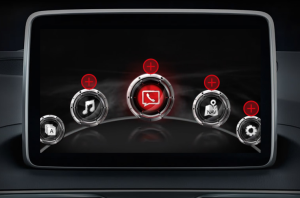
The Mazda Connect Infotainment System: An Intuitive and Feature-Packed Companion for Your Driving Experience

Mazda displays refer to the digital displays found in the dashboards of Mazda vehicles. Mazda has been incorporating advanced displays in its vehicles, which provide useful information to the driver while also enhancing the driving experience. One notable display is Mazda's Active Driving Display, which projects important driving information directly onto the windshield in the driver's line of sight, so they can keep their eyes on the road while checking speed, navigation directions, and other vital information. Another display found in Mazda vehicles is the Mazda Connect infotainment system. It features a large, intuitive touchscreen display that allows drivers to access a variety of features and functions, including navigation, entertainment, and communication. In addition, Mazda's digital instrument cluster displays provide drivers with customizable and easy-to-read information on vehicle speed, fuel economy, and other important data. Overall, Mazda's displays offer a combination of functionality and convenience, providing drivers with the information they need to stay informed and in control while on the road. Click here for more information.

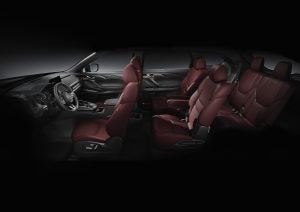
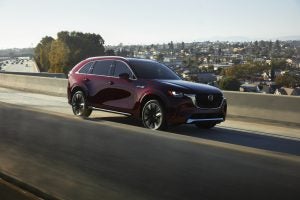
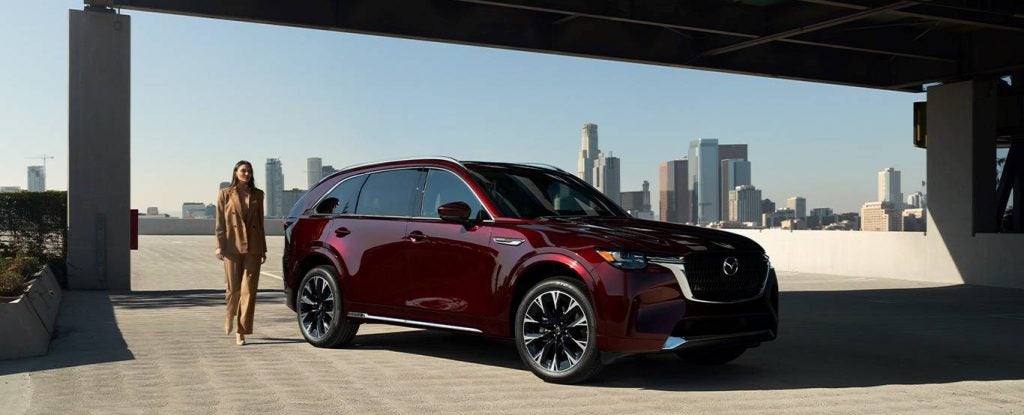
The First-ever Mazda CX-90

We crafted the first-ever Mazda CX90 around its driver. The result? Design, performance, and driver are perfectly aligned.

Every Mazda Vehicle Tested Earns 2023 IIHS Top Safety Pick Award

The Insurance Institute for Highway Safety (IIHS) today announced the winners of its 2023 top safety awards and every tested Mazda vehicle made the list. These vehicles include the Mazda3 Sedan, Mazda3 Hatchback, CX-30, CX-5, CX-50 and CX-9. New for the 2023 program year, IIHS strengthened the requirements for its TOP SAFETY PICK and TOP SAFETY PICK+ awards, demanding better side crash protection, improved pedestrian crash prevention systems and superior headlight performance. more IIHS notes the biggest change to the criteria for both awards is the replacement of the original IIHS side crash test with the updated evaluation launched in 2021. The updated test involves 82 percent more energy than the original test. Vehicles must earn an Acceptable or Good rating in this tougher test to qualify for TOP SAFETY PICK. The Mazda CX-5, CX-9, and Mazda3 all stood out with top, Good ratings in this test. "We applaud IIHS for continually raising the bar and pushing the industry to continually improve its crashworthiness and crash avoidance technologies," said Mazda North American Operations President and CEO Jeff Guyton. "Safety is a top priority for Mazda and we are proud to have all tested vehicles achieve TOP SAFETY PICK for 2023." To learn more about advanced safety at Mazda, please visit the MazdaUSA.com website - https://www.mazdausa.com/why-mazda/safety. The IIHS is an independent, non-governmental safety-testing organization, funded by the insurance industry. For more information, visit https://www.iihs.org/ratings/top-safety-picks.

Passport Mazda offers a service payment plan with 0% APR

Service payment plan 0% APR for 90 days and no up-front costs! Click here to schedule service. All loans are issued by WebBank, Member FDIC. All applications are processed through CFS and funded by WebBank, member FDIC. WebBank funds the repair amount once repairs are completed and documents are executed. All applications are subject to approval pursuant to standard underwriting criteria. The DigniFi Interest Waived Program applies to all approved customers. As part of the program, interest will be waived if you make all of your scheduled payments on time and pay off your loan in full within 90 days. The maximum approved amount, terms and the Annual Percentage Rate (APR) will be based on an evaluation of credit history. Interest will be charged to your account from account opening at 9.99%-36.00% APR if the full loan amount is not paid within 90 days. Minimum monthly payment is required. Valid on loan amounts from $350 - $7,500. Additional principal payments will be required to pay off the loan amount before promotion expires. Example on a service repair costing $5,000.00: 36 monthly payments of $211.00 with no initial payment. The estimated payment and interest rates are being provided to you only as a guide to potential financing options that may be available. This estimated payment is based upon a 27.99% interest rate, with an APR range from 9.99% to 36.00%, with a maximum 4% origination fee. This is not a loan application, an offer, guarantee of financing, or a loan approval.

Happy St. Patrick’s Day from all of us at Passport Mazda

Wishing you the luck of the Irish this St. Patty's Day and all the year through! Thank you for your continued patronage.

Take advantage of the Mazda College Graduate Finance Program offered at Passport Mazda

Experience a higher degree of exhilaration. If you’re a recent or soon-to-be college graduate—including a graduate of a select trade or vocational program—you may qualify for competitive APRs and lease terms on a new or certified pre-owned Mazda.1 You’ve earned this exciting milestone and we’re here to help guide your journey. To take the advantage of the program, you must meet one of the following: • Have graduated from an accredited four-year college, university, or registered nursing degree program during the last two calendar years or will graduate from such a school/program within the next six months • Be enrolled in or have graduated from an accredited graduate degree program during the last two calendar years • Have graduated from an accredited two-year college, junior college, technical college, or university during the last two calendar years or will graduate within the next six months more Earn credit where credit is due. On your credit application, you will need to show proof of present or future employment, starting within 120 days of your contract date. You should also know that we will determine if your income will be enough to cover vehicle payments in addition to your living expenses. The applicant or co-applicant must meet all of the college graduate program qualifications. 1College Graduate Finance Program (which is not a rebate and instead offers competitive APRs and lease terms) is available on eligible lease or finance (including preferred option) of contracts for untitled or Certified Pre-Owned (CPO) Mazda vehicles. Subject to the foregoing limits and requirements below, the College Graduate Finance Program is available upon credit approval through participating Mazda dealers and Mazda Financial Services (MFS) for finance contracts with terms up to 84 months or lease contracts with terms up to 60 months for new and current year CPO vehicles or up to 48 months for two- and three-year old CPO vehicles. Not all applicants will qualify. To qualify for the College Graduate Finance Program, applicants must meet one of the following qualifications: Graduated or will graduate with a two-year trade or vocational degree or certification (within 6 months before graduation or within 24 months after graduation date) OR graduated or will graduate from an accredited community college, junior college, technical college or university with an Associate’s Degree (within 6 months before graduation or within 24 months after graduation date) OR graduated or will graduate from an accredited college, university or registered nursing program with a Bachelor’s Degree (within 6 months before graduation or up to 24 months after graduation date) OR currently enrolled graduate students attending an accredited graduate school or up to 36 months after graduation date with a Master’s or Doctoral degree. Eligible applicants must meet proof requirement under one the following applicable options: If graduating within 6 months: provide a letter from the registrar’s office stating graduation date and type of degree; OR provide a copy of transcript that states current classes, credits earned, or credits needed for degree. If graduated within 24 months from date of purchase: provide a diploma or copy of final transcript that states type of degree and date earned. If enrolled in an accredited graduate school: copy of current transcript confirming enrollment in a graduate degree program; OR letter from the college/ university registrar’s office enrollment in a graduate degree program. At contract signing, eligible customers must furnish verifiable proof of present or future employment, which will begin within 120 days of credit approval, with a salary sufficient to cover ordinary living expenses and vehicle payments. During the last 24 months, all obligations on your credit report must have been paid within 60 days of the due date and your credit report must not show more than $1,000 in total charge-offs. College Graduate Programs are subject to change or termination at any time. Some restrictions apply. See dealer for details. Must pay sales tax. Void where prohibited by law. Not redeemable for cash. The trade name “Mazda Financial Services” and the Mazda and Mazda Financial Services logos are owned by Mazda Motor Corporation (“Mazda”) or its affiliates and are licensed to Toyota Motor Credit Corporation (“TMCC”). Retail installment and lease accounts are owned by TMCC and Toyota Lease Trust. TMCC is the authorized attorney-in-fact and servicer for Toyota Lease Trust. Mazda is solely responsible for its products and services and for promotional statements about them and is not affiliated with TMCC or its affiliates.

2024 CX-90 is available with a maximum towing capacity of 5,000 lbs.

When properly equipped, the Mazda CX-90 has a 5,000-lb towing capacity. Available Towing mode also helps with vehicle stability when driving with the extra weight, allowing you to bring along a boat or recreation trailer without sacrificing your connection to the road. Mazda Intelligent Drive Select (Mi-Drive) gives drivers the ability to switch between four distinct driving modes: Normal, Sport, Off-road, and available Towing. Each mode is designed individually to help optimize power delivery and responsiveness, keeping your connection to the road natural and intuitive in a wide variety of driving conditions. Up to 5,000 pounds of towing capacity with Mazda CX-90 Inline 6 Turbo models when activating available Towing mode. Towing mode available on select trims and requires use of a Genuine Mazda hitch. Towing capacities shown are maximums and must be reduced by the weight of any passenger, cargo hitch or optional equipment in the towing vehicle. Please refer to vehicle Owner's Manual for details regarding towing capacities and other valuable information. Towing a trailer may have an effect on vehicle's handling, braking, durability, performance and driving economy. For specific information on recommended or required equipment, see your Mazda Dealer. Please remember to properly secure all cargo.

Learn more about Mazda & Apple CarPlay at Passport Mazda

Apple Car Play™ USER GUIDE Available on select models, Apple CarPlay™ seamlessly integrates your iPhone® with your vehicle’s Mazda Connect™ display, allowing you to access useful features and apps while staying focused on the road ahead. BASIC REQUIREMENTS •   To use Apple CarPlay, you’ll need an iPhone 5 or above •   For best performance, it is always recommended that you update your iPhone to the latest iOS version •   You’ll need an Apple Lightning® to USB cable to make the connection •   Siri® must be enabled to use Apple CarPlay more CONNECT YOUR i PHONE 1. Connect an Apple Lightning to USB cable to your iPhone and the USB port in the center stack or inside the center armrest (depending on vehicle model) 2. Mazda Connect™ will detect your iPhone 3. If you’re a first-time user, follow the on-screen prompts to enable Apple CarPlay 4. If you’re a first-time user, select ”Allow” on the pop-up notification displayed on your iPhone. This will allow your vehicle to access Apple CarPlay content on your iPhone without requiring you to unlock your iPhone first On vehicles equipped with Wireless CarPlay, such as the 2023 Mazda CX-50, an additional pop-up notification will be displayed on your iPhone asking, "Use Wireless Apple CarPlay with "Mazda"?" Select "Enable Wireless CarPlay" if you'd like to enable wireless connectivity or select "Use USB Only" if you'd like only to use Apple CarPlay when your iPhone is connected via USB. Enabling a Wireless Apple CarPlay Connection After Connecting Via USB After the Apple CarPlay user interface has appeared on the Mazda Connect display, you can unplug the USB cable which will end the current Apple CarPlay session. To enable the wireless connection to Apple CarPlay: 1. Press the Home button 2. Tilt the Commander Knob to the right 3. Select the desired Apple device 4. Mazda Connect will establish a wireless connection with the device and the Apple CarPlay user interface will resume on the Mazda Connect display                                                                                                                               2 COMMANDER  CONTROL Once connected, the easiest way to quickly access Apple CarPlay from the Mazda Connect screen is to press and HOLD the Home button until the Apple CarPlay screen appears. Once connected, slide the Commander control to the right when on the Mazda Connect home screen and the Apple CarPlay icon is present. SECTIONS AND ICONS MAPS Displayed prominently in the middle of the screen. Note: The Maps section of Dashboard View will always display Apple Maps. Third-party navigation apps can be used via Apple CarPlay, but will not appear in Dashboard View. SMART SIRI SUGGESTIONS Provides quick access to commonly used tasks. This allows you to view, interact with and/or select three of your most recently used apps (e.g., music, podcasts, meeting notices via calendar app, etc.). SIDEBAR Displays your most recent (or currently in-use) icons, time, signal and network, and the App View icon (formerly the “Home” icon). •   Using the Commander control, highlight and press the App View icon to change to App View •   Using the Commander control, highlight, press and HOLD the App View icon to activate Siri APPS Ten app tiles are displayed on the App View screen. Rotate the Commander control to highlight an app in blue. Press down to launch. RECENTLY USED APPS Displayed on the left side of the App View screen. Note: The recently used apps sidebar is not selectable when in App View. DASHBOARD VIEW/APP VIEW •   Short press – Switches to Dashboard View •   Long press – Activates Siri Displays upcoming appointments from your Calendar App. If a destination is attached to an appointment, you can launch Apple Maps for directions straight from the Calendar App. Access personalization settings that include: •   Do Not Disturb While Driving (pauses all notifications) •   Appearance – “Automatic” (light/dark) or “Always use Dark Mode” •   Siri Suggestions (On/Off) •   Show album art (On/Off) Select the Mazda icon to return to the Mazda Connect home screen. You can also press and HOLD the Home button on the Commander control to toggle between Apple CarPlay and Mazda Connect interfaces. Dots at the bottom of the screen indicate that there are more available apps. Rotate the Commander control to the right to view more apps. USING THE COMMANDER CONTROL ON THE HOME SCREEN The sidebar contains recently used apps, clock, signal strength and the Home button. The sidebar is available on all Apple CarPlay screens •   To highlight a recently used app, rotate the Commander control to the left, then press down to select and launch the highlighted app •   To highlight the Home button, rotate the Commander control to the left. Press the knob to return to the Apple CarPlay home screen. Press and hold the knob to activate Siri MAIN DISPLAY The middle of the screen displays apps compatible with Apple CarPlay • Rotate the Commander knob left or right to highlight the desired app (or feature tile in Dashboard view) ▪ Slide the Commander control forward/rearward to quickly skip from one line to the next • Press down on the knob to select and launch the app (or to access a feature tile in Dashboard View) ADDITIONAL APPS •   To access additional pages of apps, rotate the Commander control to the right. Or, at the end of a line of icons, slide the Commander control to the right HOME BUTTON • Press and HOLD the Home button to toggle between Apple CarPlay and Mazda Connect screens (when a compatible iPhone is connected) • Press the Home button to quickly return to the Apple CarPlay home screen from inside Apple CarPlay apps Press the Home button from Dashboard View or App View to toggle between the two views ENTERTAINMENT BUTTON •   When listening to music from an app that is compatible with Apple CarPlay, press the Entertainment button to pull up the Now Playing screen When listening to music via Apple CarPlay, the Entertainment button will open the Now Playing screen, even while using Mazda Connect MAP BUTTON • Press the Map button to quickly access the Apple Maps screen or current route guidance •   If a route is set using Apple Maps, the Map button will open the Apple Maps screen, even while using Mazda Connect BACK BUTTON • Press the Back button to return to the previous screen ACTIVATING SIRI STEERING WHEEL CONTROLS Press the “Talk” button on the steering wheel to activate Siri. Note: Not all third-party apps support voice recognition through Siri. COMMANDER CONTROL On Dashboard View, rotate the Commander control to highlight the App View/Dashboard View icon. Then, press and HOLD the Commander control to activate Siri. SAYING COMMANDS After Siri is activated, you’ll hear an audible prompt, with the signature Siri light waves at the bottom of the display. For more information on Siri and its functionality, visit: https://www.apple.com/ios/siri/ USING THE PHONE APP •   From the App View screen, rotate the Commander control to highlight the Phone app icon and press the Commander control down to open • Rotate the Commander control to choose between: Favorites, Recents, Contacts, Keypad and Voicemail •   After selecting a menu item (e.g., Contacts), slide the Commander control rearward for additional options BROWSING CONTACTS • Rotate the Commander control to browse contacts one at a time • Slide the Commander control rearward (or forward) to skip contacts by letter PLACING A PHONE CALL • Via Contacts – (when parked) Highlight the contact you want to call. Press the Commander control to call that contact • Via Keypad – (when parked) Rotate the Commander control to highlight numbers on the keypad. Press the Commander control to enter a number • Via Siri – Press the “Talk” button on the steering wheel and say, “Call,” followed by a contact’s name ANSWERING A PHONE CALL •   Rotate the Commander control to highlight the “Answer” icon on the screen. Press the Commander control to answer •   Press the “Talk” button on the steering wheel to answer 1 CATEGORIES – Change content categories           2 CONTENT – Scroll to view and select content PLAYING MUSIC •   From App View – Rotate the Commander control to highlight Music, then press down to select and launch •   If third-party music and media apps are downloaded and installed (e.g., Spotify, Pandora), rotate the Commander control to select and launch the desired app •   Once an app launches, rotate the Commander control to scroll through your music or audio choices •   Stop at the desired song, artist, album or playlist and press down on the Commander control to play 1 BACK – Return to previous                             3 NOW PLAYING – With controls for pause/play and skip 2 UP NEXT – See song in queue                         4 SONG OPTIONS – Scrub bar, shuffle, more options, repeat USING VOICE COMMANDS TO PLAY MUSIC Press the “Talk” button on the steering wheel to activate Siri, then say, “Play,” followed by your desired music choice (e.g., song, title, album name, artist name). ACCESSING APPLE MAPS • Via App View – On the Apple CarPlay home screen, rotate the Commander control to highlight the Maps icon and press down to select • Via Dashboard View – Apple Maps is always displayed in Dashboard View. To view the map at full screen, simply rotate the Commander control to highlight the map and press down to select 1 DESTINATION OPTIONS 2 MAP CONTROLS INTERACTING WITH APPLE MAPS •   Menu options are listed on the right side of the screen. If map options are not visible, press down on the Commander control to bring them up •   To center the map, rotate the Commander control to highlight and select the arrow icon •   To toggle between 3D and flat-map images, highlight and select “3D” •   To adjust the map area, rotate the Commander control to the right to highlight and select the map adjust button •   To Zoom in and out of the map, rotate the Commander control to the right to highlight and select the toggle buttons (+/-) NAVIGATING TO A DESTINATION • Rotate the Commander control to select either Search or Destinations ▪ Search (POIs, such as gas stations, parking, restaurants) ▪ Destinations (via Siri voice command or via manual input) – View and navigate to recently visited destinations • Press the “Talk” button on the steering wheel to activate Siri, then say, “Navigate to,” followed by your destination •   You can also use Siri to find POIs (e.g., “Find a gas station nearby”) SHARE ETA •   Use the Commander control to select “Share ETA” •   Send your ETA to a contact SEARCH •   Select the Search function during a route to bring up additional POIs •   Select a POI to add it as a “via point” in your route READING AND REPLYING TO MESSAGES •   All incoming messages are briefly displayed as banner notifications on the bottom of the screen. To read or respond, press down on the Commander control when the banner notification is visible. Siri will read your message and prompt you to reply. It will also give you the option to call the sender or replay the message •   After the banner notification disappears, you’ll see a red notification icon on your Messages app, indicating that you have an unread message • Rotate the Commander control to highlight Messages on the Home Screen (App View) or in the sidebar (recently used apps). Press down to select •   Select a message to have Siri read it aloud. Siri will ask you if you want to reply to the message SENDING MESSAGES •   Activate Siri, then say, “Text,” followed by the contact’s name •   Siri will prompt you to dictate and confirm your message ADDITIONAL FEATURES • Review – Replay and review your messages instantly and quickly (bypass Siri) • Send Manually – Use the Commander control to send a message manually by highlighting “Send” and pressing down Apple CarPlay™ TOUCHSCREEN OPERATION By default, Apple CarPlay can be operated via the commander control at all times and via the touchscreen while the vehicle is stopped. However, you can enable touchscreen operation while the vehicle is in motion in the Mazda Connect Settings. HOW TO ENABLE TOUCHSCREEEN IN MOTION: 1.  Press the Home button. 2.   Scroll down and select Settings. 3.   Scroll down and select Connectivity Settings. 4.   Select Bluetooth®/Phone Connectivity Settings. 5.   Scroll down and select a Apple CarPlay compatible device. 6.   Scroll down and select Touchscreen in Motion for All Devices. All devices connected to Apple CarPlay can be controlled via the touchscreen while the vehicle is in motion with the box checked *Touchscreen in Motion is only available on the 2022 Mazda CX-50

Get the right finance program at the most competitive rates at Passport Mazda

AUTO LOANS The Passport Mazda finance department is focused on ensuring your experience with our dealership exceeds your highest expectations. Our friendly finance managers work with people from all over including Suitland, MD, Bowie, MD, and Alexandria, VA to ensure our customers get the right finance program at the most competitive rates. We strive to work with each customer to ensure their satisfaction. We have financed customers from Marlow Heights, MD to Camp Springs, MD. Whether you are right down the road or an hour away from Suitland, MD you can use our quick pre-approval form to qualify for one of our finance programs. Additionally, we provide you with a payment calculator to estimate your buying power and monthly payments. OUR FINANCIAL SERVICES INCLUDE: • Competitive rates direct from the manufacturer and local Maryland banks • Quick approvals • Value-added services to protect your vehicle investment • Extended warranty programs • And many more finance programs to fit your needs ONLINE CREDIT APPLICATION Fill out our online credit application and get pre-approved for your next vehicle. Click here to get Pre-Approved

Save on Mazda premium oil service at Passport Mazda

You can confidently drive knowing your Mazda is operating at peak efficiency with Genuine Mazda Premium Oil, specifically engineered for optimal performance, protection, and fuel economy. MAZDA PREMIUM OIL SERVICE Starting at $84.99 Includes Mazda standard oil and factory filter, multi-point inspection, and topping off of washer fluid. Schedule Service

Every Mazda vehicle tested earns 2023 IIHS Top Safety Pick Award

The Insurance Institute for Highway Safety (IIHS) today announced the winners of its 2023 top safety awards and every tested Mazda vehicle made the list. These vehicles include the Mazda3 Sedan, Mazda3 Hatchback, CX-30, CX-5, CX-50 and CX-9. New for the 2023 program year, IIHS strengthened the requirements for its TOP SAFETY PICK and TOP SAFETY PICK+ awards, demanding better side crash protection, improved pedestrian crash prevention systems and superior headlight performance. more IIHS notes the biggest change to the criteria for both awards is the replacement of the original IIHS side crash test with the updated evaluation launched in 2021. The updated test involves 82 percent more energy than the original test. Vehicles must earn an Acceptable or Good rating in this tougher test to qualify for TOP SAFETY PICK. The Mazda CX-5, CX-9, and Mazda3 all stood out with top, Good ratings in this test. "We applaud IIHS for continually raising the bar and pushing the industry to continually improve its crashworthiness and crash avoidance technologies," said Mazda North American Operations President and CEO Jeff Guyton. "Safety is a top priority for Mazda and we are proud to have all tested vehicles achieve TOP SAFETY PICK for 2023." To learn more about advanced safety at Mazda, please visit the MazdaUSA.com website - https://www.mazdausa.com/why-mazda/safety. The IIHS is an independent, non-governmental safety-testing organization, funded by the insurance industry. For more information, visit https://www.iihs.org/ratings/top-safety-picks.

Contact Us

Fill out this form below and we'll contact you shortly
*Required Fields